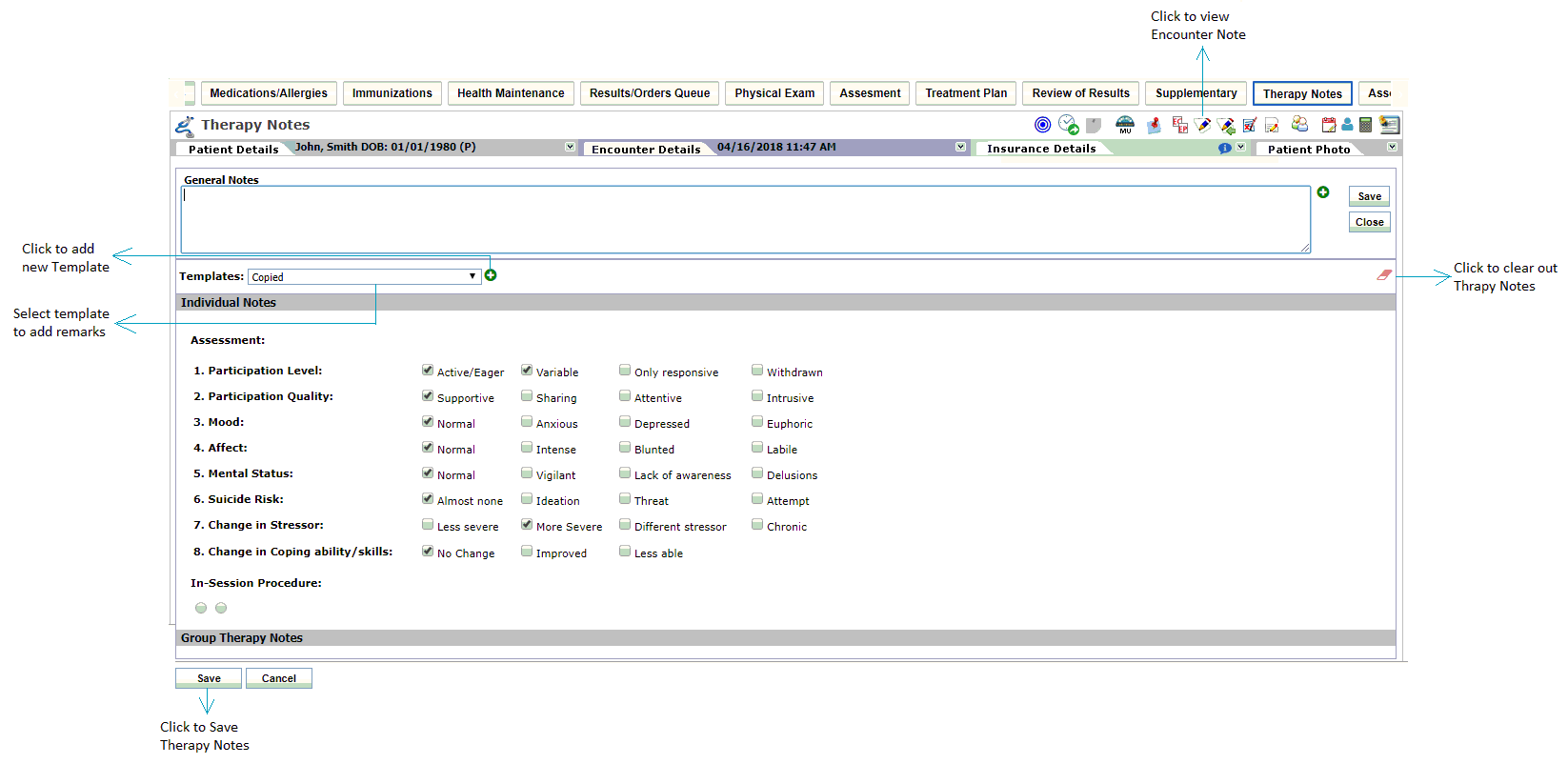
When patient is a part of group therapy, provider may want to add individual notes or comments regarding therapy. System facilitates users to add therapy notes from the charting ribbon. This charting element also can be accessed from the Facesheet by starting a new encounter.
Therapy notes added here are also displayed on the Encounter note.
To add therapy notes:
| 1. | From the the group therapy screen, click the  to view the list of other charting elements, and click Therapy Notes or to view the list of other charting elements, and click Therapy Notes or |
| 2. | In the charting elements ribbon, click Therapy Notes. The Therapy Notes screen is displayed. |
| 3. | In the Individual Notes section, users can add notes using templates. |
| 4. | To add remarks using template, click select the template using drop-down list. |
| 5. | To create a new template, click the  icon. icon. |
| 6. | To clear out the notes details, click the  icon. icon. |
| 7. | To view added notes on the Encounter note, click  on the Facesheet. on the Facesheet. |
| 8. | Click the Cancel button to clear out the recorded details. |
Note:
| • | General Notes can be added from the top of the screen. You can also use the macros to add general notes. |