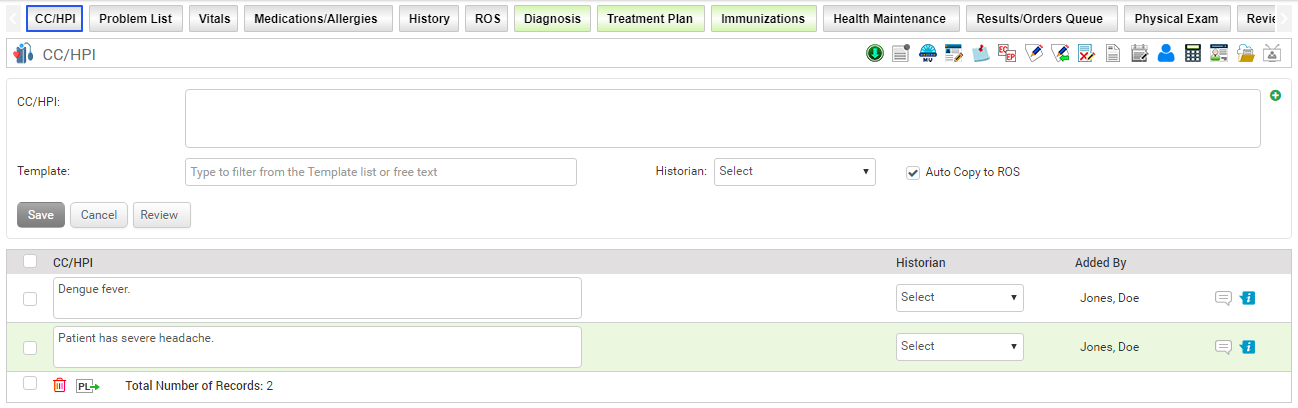
Chief Complaint is a statement made by a patient describing the most significant or serious symptoms, or signs of illness, that caused the person to seek healthcare. Following the chief complaint, complete details of the illness is recorded; that is referred to as History of Present Illness (HPI).
To record a chief complaint/ HPI:
| 1. | In the charting elements ribbon, click CC/HPI. |
| 2. | Enter the exact complaint as presented by the patient in the CC/HPI text box. Maximum of 5000 characters can be entered in the text area. |
| 3. | In the CC/HPI field, click the  icon to add a new macro. The Macro Details screen opens. Do the following: icon to add a new macro. The Macro Details screen opens. Do the following: |
| o | To insert the note from the pre-configured macro, select appropriate macro name from the drop down list and click Insert. |
| o | To add a new macro or edit the existing macro, click the Configuration button. Once added or updated the macro, click Save. |
| 4. | In the Template field, enter the first few characters of the chief complaint and a list will pop up for you to select from. When you try to record an HPI template which is not available in the HPI templates list, the user will see a message while saving. Only after clicking the OK button, the recorded HPI will be added in the HPI templates. |
| 5. | Select one or more historians from the Historian drop-down list. |
| 6. | By default, the Auto Copy to ROS check box is selected to copy the recorded complaints in the ROS section. |
| 7. | The chief complaint is added to the grid below. You can drag and drop the complaints to change their sequence according to your requirement. |
| 8. | Click the .png) icon to record the History of Present Illness (HPI). HPI is a detailed interview with the patient of the onset, duration, and character of the present illness, as well as many other factors that aggravate the symptoms. Based on the patient’s reply, select the necessary check boxes. icon to record the History of Present Illness (HPI). HPI is a detailed interview with the patient of the onset, duration, and character of the present illness, as well as many other factors that aggravate the symptoms. Based on the patient’s reply, select the necessary check boxes. |
| 9. | To export the chief complaints to the Problem list section, click the Export to Problem List icon  . . |
Notes:
| • | The Historian list is preconfigured in the system. Contact InSync EMR Support to add or remove historians from the list. |
| • | Once the chief complaint is reviewed, select the Review button. Your name will display as a reviewer along with date and time. |
| • | Click the Delete icon  to delete the chief complaint added. to delete the chief complaint added. |
| • | If the patient’s consent is recorded on the Patient Information screen, the encounter summary is generated with the chief complaints and notes, and sent automatically to the NYU HIE through HL7. |