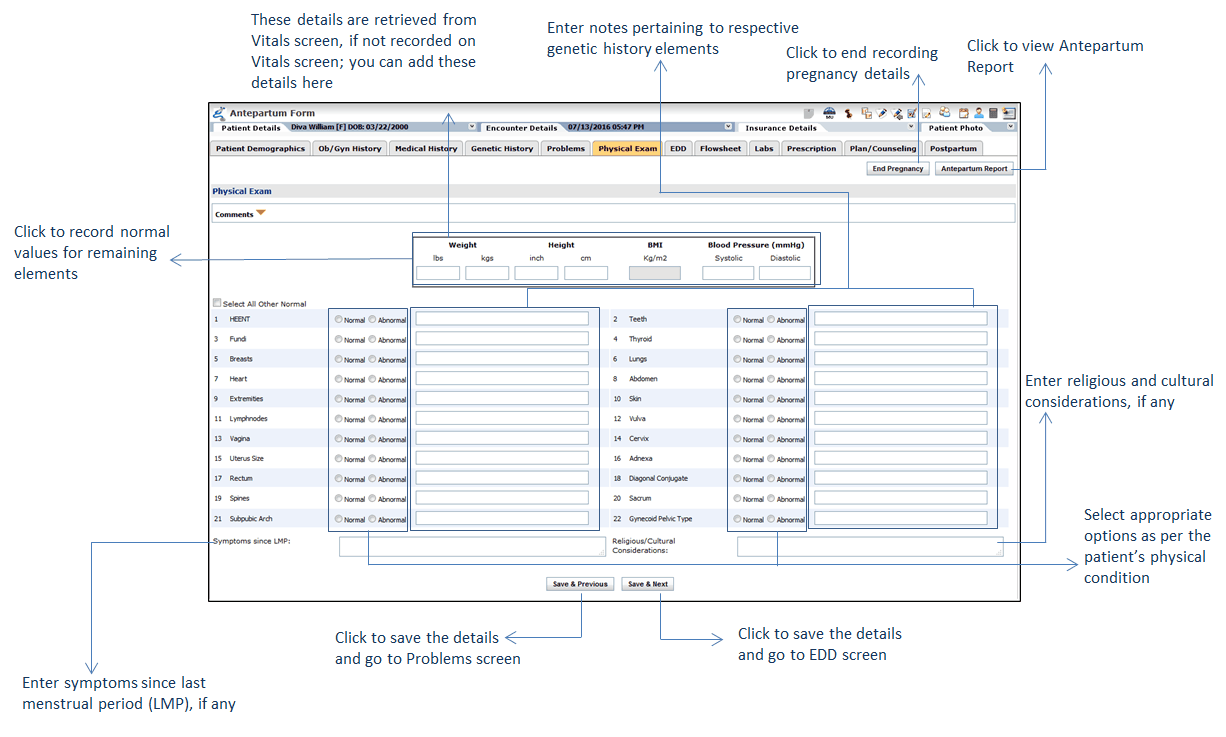
When the patient’s vital information is captured (Weight, Height, BMI, and Blood Pressure), it is displayed in the Physical Exam section of the Antepartum form. If vitals are not captured earlier, you can still record them on this form. In addition to this, you can find a preconfigured list of elements that you can record as normal or abnormal. The fields “Symptoms since LMP” and “Religious/Cultural Considerations” help you to record appropriate details. You can also add comments, if required. All these details appear on the Antepartum Report.
To record a patient’s physical exam findings:
| 1. | In the charting elements ribbon, click Antepartum Form. |
| 2. | To open problems section, click Problems.The Physical Exam screen is displayed. Patient's Weight, Height, BMI, and Blood Pressure is displayed as it is recorded on the Vitals screen. If its not recorded on the Vitals screen, you can record it here. |
| 3. | In the Physical Exam section, select appropriate options to examine patient's body for signs of disease. |
| 4. | To enter notes specific to any element body systems , enter the notes in the text box provided next to that body system. |
| 5. | Enter Symptoms since LMP, if any. |
| 6. | Enter Religious/Cultural Considerations, if any. |
| 7. | Enter Comments, if any. |
| 8. | Click Save & Next. The EDD screen is displayed. |