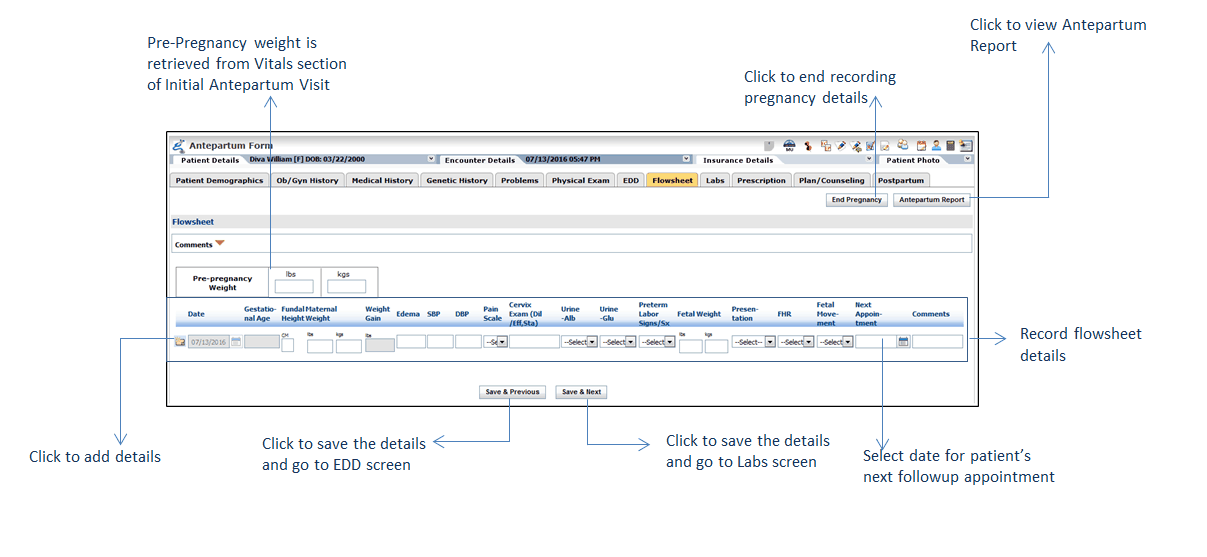
The Flowsheet section allows capturing information related to antenatal assessment such as, pre-pregnancy weight, gestational age, maternal weight, and so forth. System allows providers to book patient’s follow-up visit from this section. Once the next appointment date is selected, system sends To Do to the selected group to book follow-up appointment for the patient. All the details recorded in the Flowsheet tab appear on the Antepartum Report.
To record Flowsheet:
| 1. | In the charting elements ribbon, click Antepartum Form. |
| 2. | To record the flowsheet, click Flowsheet. |
| 3. | Enter Pre-pregnancy Weight. |
| 4. | In the Date field, system auto-populates the current date. |
| 5. | Enter the additional details that includes, Fundal Height, Maternal Weight, Weight Gain, and so on. |
| 6. | Enter or select the date on which patient need to visit the provider in the Next Appointment field. |
| 7. | Enter Comments, if any. |
| 8. | Click  to save the details. Once clicked, system displays the pop-up where users can select a user group. A To Do for booking a followup appointment is sent to the selected group so they can book appointment for the patient. to save the details. Once clicked, system displays the pop-up where users can select a user group. A To Do for booking a followup appointment is sent to the selected group so they can book appointment for the patient. |
Notes:
| • | Pre-pregnancy weight is retrieved from the Vitals section of initial Antepartum Visit. |
| • | Maternal Weight, SBP, and DBP are retrieved from the Vitals section of current encounter. Providers can add these details if they are not recorded in the Vitals section. Details recorded in the Flowsheet tab also appears in the Vitals section. |
| • | Weight gain is auto-calculated from difference of pre-pregnancy weight and maternal weight. |
| • | Details recorded in flowsheets of previous encounters of the current pregnancy are displayed in the Flowsheet section. |