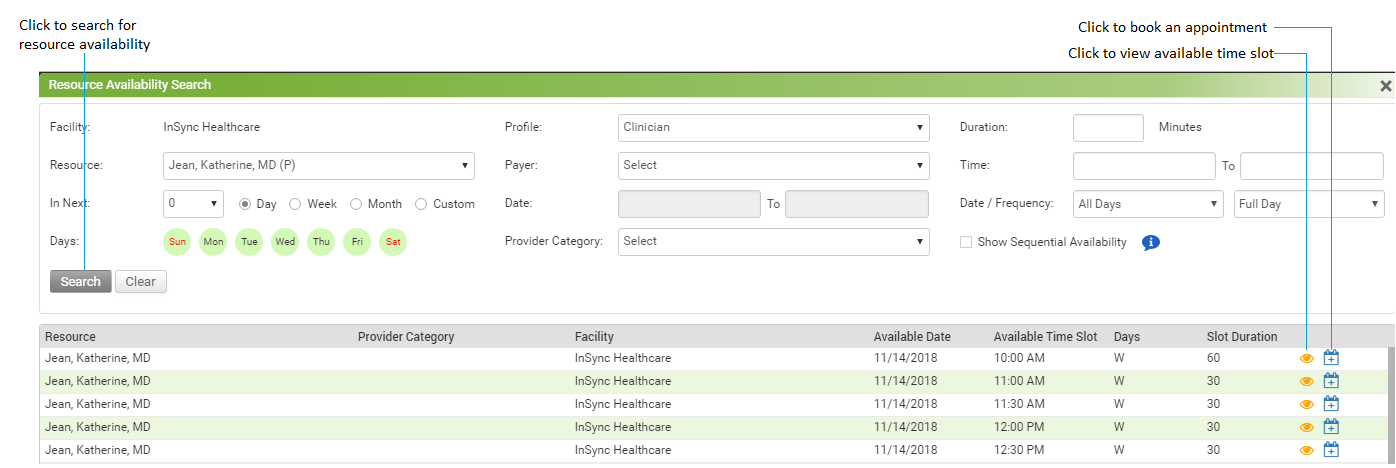
The Resource Availability Search tab allows you to search the available time slots for various resources of the facility.
To perform a Patient Appointment Search:
| 1. | Click the resource availability search icon  from the Scheduler screen. from the Scheduler screen. |
| 2. | Select the search criteria, such as Resource, In Next (Day, Week, Moth, Custom), Provider Category, Profile, Payer, and etc. to find the availability of the resources. |
| 3. | Click the "Search" button to view all available appointments for the selected search criteria. |
| 4. | To sort and view appointments by time, enter From Time and To Time. |
| 5. | To sort and view appointments by date within a specific range, use the 'Select Date/Frequency' drop-down menu. |
| 6. | To filter out the appointments by specific days, select the days depending on patient preference. |
| 7. | Click Search to find the availability of resources based on the search criteria. |
| 8. | Click the View icon next to any time slot to navigate directly to that appointment slot in the Scheduler. next to any time slot to navigate directly to that appointment slot in the Scheduler. |
| 9. | Click the Book Appointment icon  to book an appointment for that time slot. to book an appointment for that time slot. |