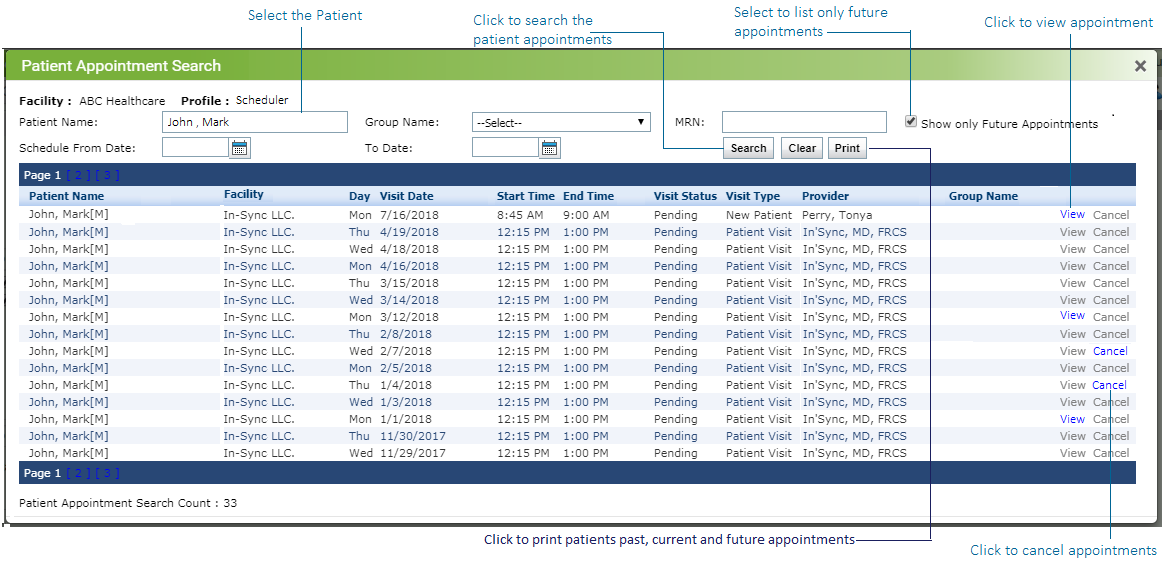
The Patient Appointment Search feature allows users to view patient appointment history, as well as future scheduled appointment(s) for particular patient.
To perform a Patient Appointment Search:
| 1. | Click the  icon. icon. |
| 2. | Enter the patient name or MRN number. |
| 3. | Enter the date range in which to search for that appointment. |
| 4. | Click "Show only future appointments" if you want to view only future appointments. |
| 5. | Click the "Search" button to retrieve the list of appointments. |
| 6. | Click "View" next to the appointment listing to view the patient appointment in Scheduler. |
| 7. | Click "Cancel" next to the appointment listing to cancel the appointment. |
| 8. | Click Print to print patient's past, current and future appointments. |