Managing User Rights

Contents
InSync now facilitates you to assign View/add/Edit/Delete rights to both scheduler and resources.
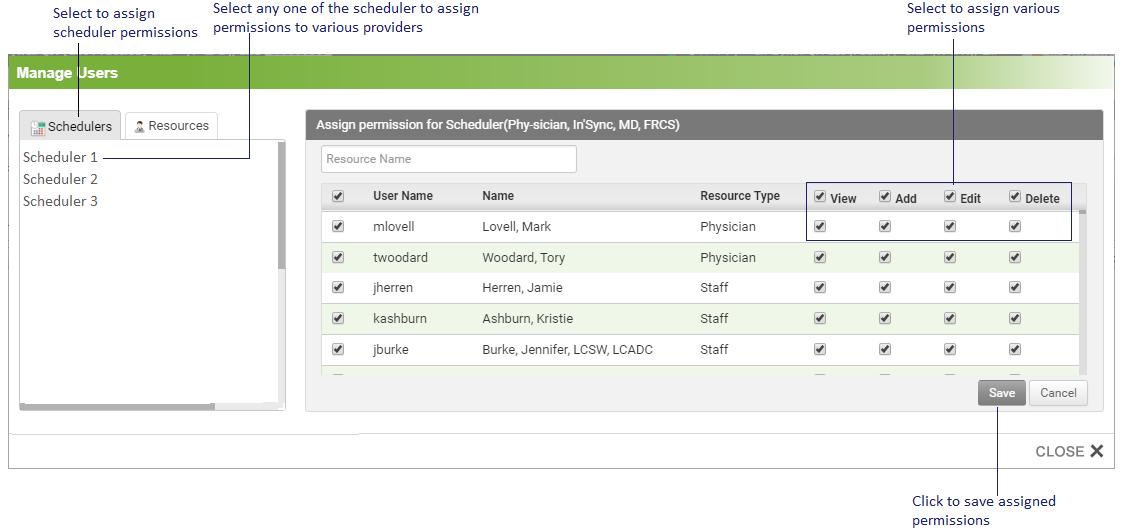
To assign resource permissions to various schedulers, do the following:
| 1. | Click on the Manage Rights button that appears on the Scheduler setup screen |
| 2. | On the Manage User Rights pop up, select Scheduler option and the list of resources will appear in the right panel. |
| 3. | Select one of these check boxes to assign rights accordingly: |
| ▪ | View: Select this check box to assign view permissions. |
| ▪ | Add: Select this check box to assign add permissions. |
| ▪ | Edit: Select this check box to assign edit permissions. |
| ▪ | Delete: Select this check box to assign delete permissions. |
4. Click Save, to assign scheduler permissions to the providers.
Similarly, to assign scheduler permissions to various resources, do the following:
1. Click on the Manage Rights button that appears on the Scheduler setup screen.
2. On the Manage User Rights pop up, select Resources option and the list of schedulers will appear in the right panel.
3. Select one of these check boxes to assign rights accordingly:
| ▪ | View: Select this check box to assign view permissions. |
| ▪ | Add: Select this check box to assign add permissions. |
| ▪ | Edit: Select this check box to assign edit permissions. |
| ▪ | Delete: Select this check box to assign delete permissions. |
4. Click Save, to assign permissions to the resources.