Filtering Appointments Based on The Reminder Status

Contents
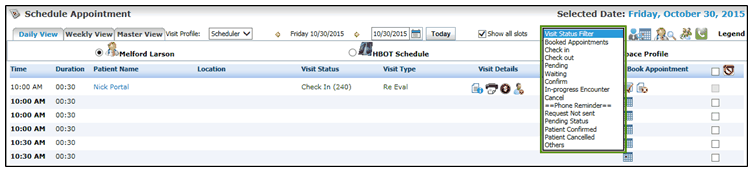
When you are working with the Schedule Appointment screen, it might be complicated to identify the appointment reminders with different statuses. In order to make it little easy, filters have been provided to view the appointment reminders for theses statuses. The different statuses are; Request Not Sent, Pending Status, Patient Confirmed, Patient Cancelled, and Others.
To filter an appointment reminder based on status:
| 1. | From the top menu items, click Scheduler. The Schedule Appointment screen opens up. |
| 2. | In the Daily View section, locate the “Visit Status Filter” drop-down list on the top right section in the menu bar. |
| 3. | Click the drop-down list. In the Phone Reminder section, a list is provided with different appointment reminder statuses. |
| 4. | Select an appointment reminder status. The system will filter the appointments accordingly and display on the Schedule Appointment screen. |