Adding Additional Information in General Section

Contents
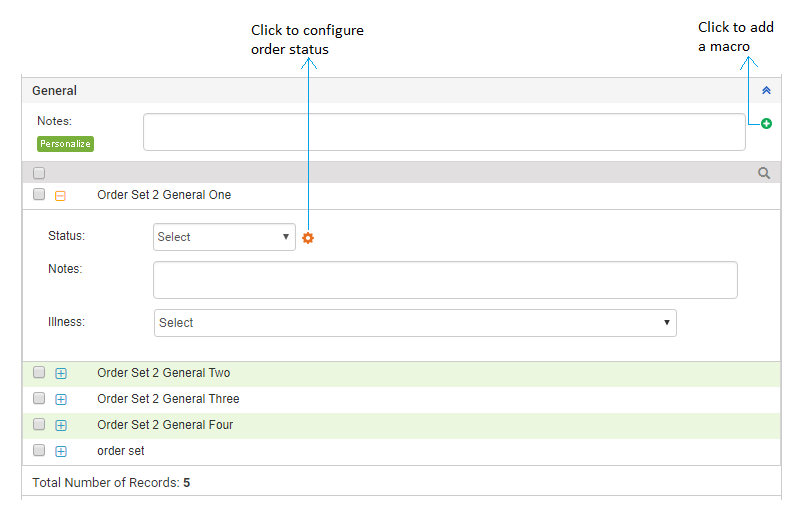
The General section of Treatment Plan can be customized according to the user’s requirement. Based on the need, users can rename them from the Practice Defaults section in Administration. The notes can be entered in the box provided. There are 2 ways you can enter the notes: common notes for all the procedures and line item level notes for each item inside. The ready-made templates can be used to insert the notes. The user can configure these templates in the system, also known as macros. The order status can be recorded as performed, reviewed, etc.
Once the general items are recorded, they can be viewed on the General ribbon along with the CPT code, number of units ordered, diagnosis codes attached to the order, modifiers, and generalized notes.
To record general and other information from Treatment Plan:
| 1. | On the Treatment Plan screen, click the General link. |
Note: The General captions are configurable. Hence, if you see the different captions in your Treatment Plan, it means someone might have changed the captions. You can change the General and Other captions from Administration > Treatment Plan section.
| 2. | On clicking the General link, a list of configured items in the General section appear. |
| • | Enter any generalized notes pertaining to all the General items being recorded. |
Note: Click the  icon near the Note box to use the preconfigured notes added with the help of macros. The macros can be configured from the Administration > Treatment Plan > General section.
| • | To search any specific General listed options you can use quick search panel that appears just above the listed General options. |
| • | Select the check boxes near the General items to record them. |
| • | Click the Plus icon ( ) near the General item to expand the details. ) near the General item to expand the details. |
| • | Select the Order Status (Pending, Reviewed, Performed, Completed, Late Pending, Authorization Pending, or Ordered) from the drop-down list. |
Note: The order status section can be customized according to your requirement using the wheel icon  .
.
| • | Enter any notes pertaining to the selected General item. |
Note: Click the icon near the Note box to use the preconfigured notes added with the help of macros. The macros can be configured from the Administration > Treatment Plan > General section.
| • | Hover mouse over the Illness section. A list of illnesses recorded in the Diagnosis section of that encounter appears. Maximum 4 illnesses can be selected. |
Note: Recording the units, modifiers, and illnesses helps the PM users to import these details automatically when creating a charge.