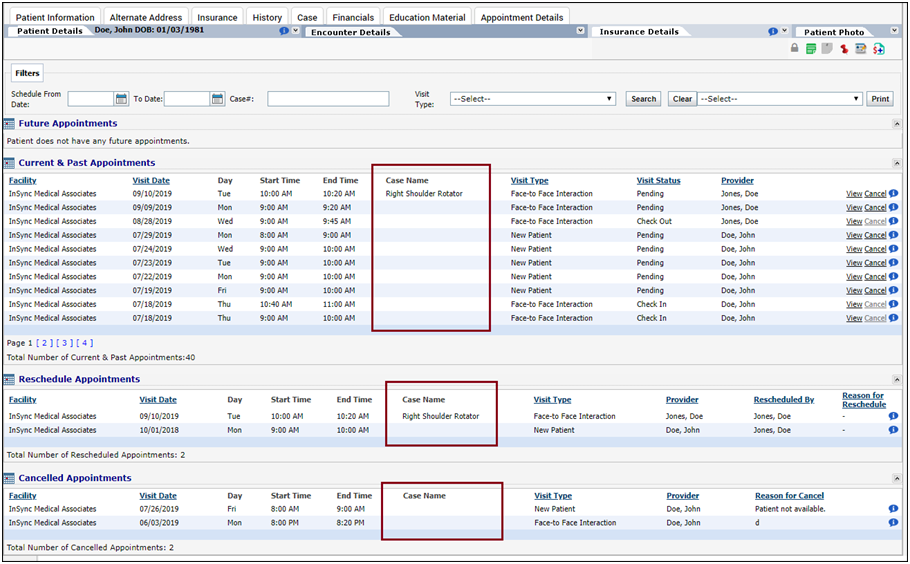
When editing the patient details, you can access patient’s all the Future, Current & Past, and Cancelled appointments in the Appointment Details section. You can view and cancel any of the listed appointments. The appointments can be sorted by Facility, Visit date, Visit type, Visit Status, and Provider.
To access the Appointment Details section:
| 1. | From the Bookmarks on your left pane, click the Patient Search icon  . . |
| 2. | Search the desired patient using search criteria. |
| 3. | To edit the patient details, click the  icon prior to the patient name. icon prior to the patient name. |
| 4. | Click Appointment Details. You can use the filter to search out scheduled, rescheduled and canceled appointments. |
| 5. | Future Appointments, Current & Past Appointments and Canceled Appointments appear in 3 different sections. Do the following; |
| • | To view any of the listed appointment on Scheduler, click View. You are then navigated to the Scheduler screen with this appointment selected. |
| • | To cancel any of the listed appointment, click Cancel. The appointment is then canceled and removed from the Scheduler. |
| • | Click Print to print the list of Future Appointments, Current & Past Appointments and Canceled. |
Notes:
| • | Appointments other than logged-in facility cannot be viewed or canceled. |
| • | Appointments for which encounter is in progress, copay is collected, and superbill or charge is generated, cannot be canceled. |